An AI assistant that answers from your documents and acts only when you say so
A side panel on every page. Ask it what you say about subprocessors and it answers with the sources. Ask it to assign every backup question to Maria and it shows you the proposal, and waits.
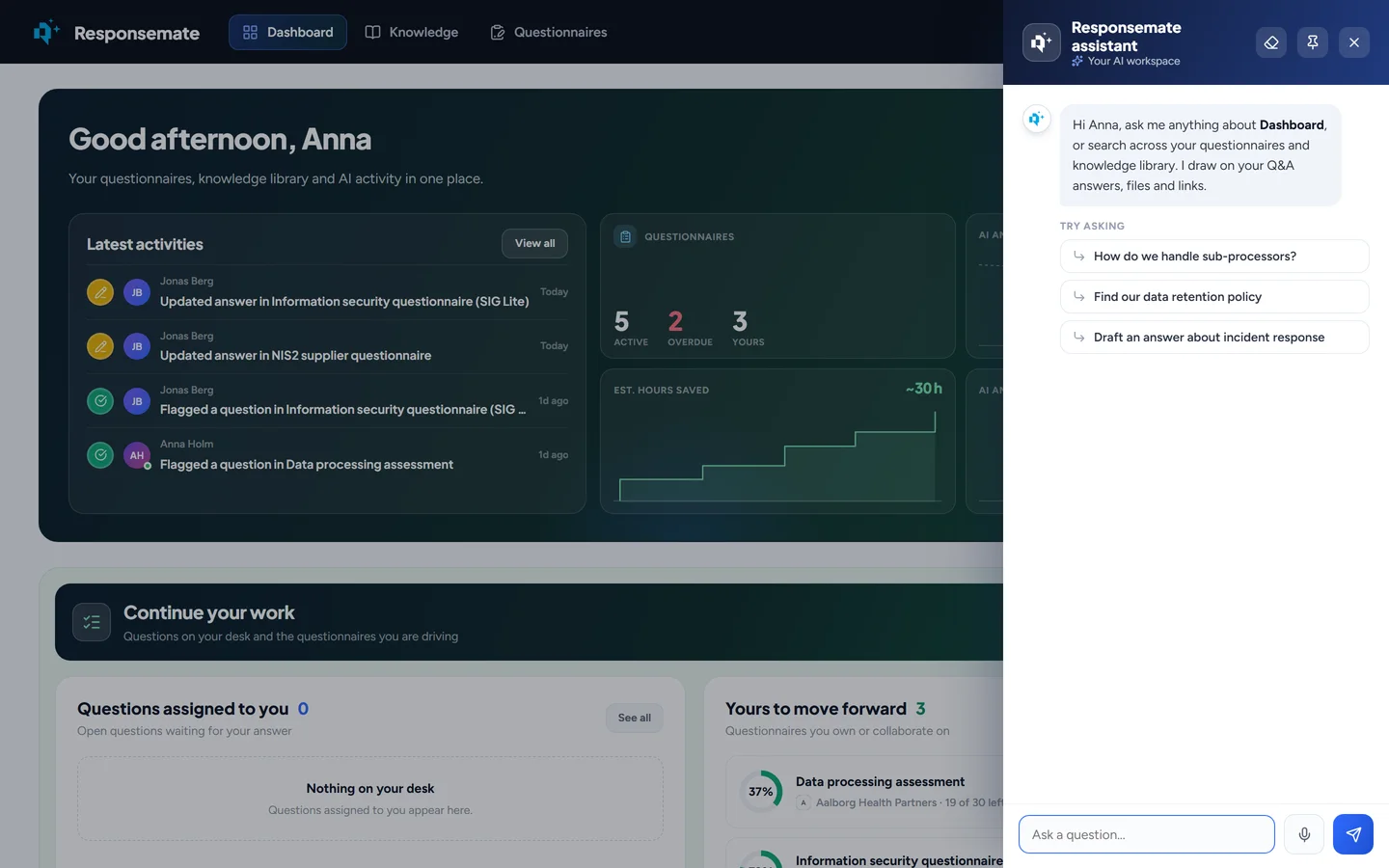
The assistant opens from the round button at the bottom right of every page. It knows which page you are on.
It answers. It can also do things. It never does them without asking.
The assistant reads the page you are on, so "sum this up" or "what is overdue here" work without explanation. When you ask it to change something, it shows a proposal that names exactly what will change. You confirm it or drop it, and most actions can be undone from the same reply.
- Answers from your Q&A entries, files, links and past questionnaires, with the sources listed
- Scoped to the open questionnaire, or to the whole workspace
- Approves, reopens, flags and assigns questions; sets deadlines, collaborators and notes
- Writes, improves or rewrites an answer straight into the cell
- Creates and edits Q&A entries, renews expiration dates, runs the cleanup, attaches evidence
- Speak instead of typing; the transcript lands in the box for you to check first

Answers with their sources
Ask a question in your own words. The assistant answers from your knowledge base and lists what it used: "What do we say about subprocessors?" returns the answer with the data processing agreement and the two Q&A entries it came from. On a questionnaire it can keep to that questionnaire's evidence; elsewhere it looks at the whole workspace. The conversation follows you between pages.
- Every answer lists its sources
- Questionnaire scope or workspace scope
- Knows the page you are on and can sum up what is on it
- Also answers questions about Responsemate itself, from its own help articles, if you switch that on

Works on the open questionnaire
"Assign every question about backups to Maria and flag the ones with low confidence" becomes two proposals you confirm. It can approve, reopen, flag or assign questions, set the deadline, collaborators or the shared note, clear cells or rerun the AI on them. Ask for a draft, an improvement or a rewrite and it places the text in the cell, or turns a free-text cell into a dropdown with the choices you give it.
- Approve, reopen, flag, assign, in bulk if you ask
- Deadline, collaborators, notes, cleared cells, AI reruns
- Drafts, improvements and rewrites straight into the cell
- Attaches a file from the library to one or more questions, or accepts the AI's suggestions

Keeps the knowledge base current
"Add a Q&A entry saying we rotate keys every 90 days, tagged Encryption" creates the entry after you confirm. The assistant can create, edit or delete entries, add links, renew expiration dates, retry files that got stuck and settle conflicts the cleanup found. From the cleanup page it starts a scan, applies text improvements, merges or keeps overlapping pairs and accepts or dismisses suggestions.
- Create, edit, delete Q&A entries; add links
- Renew expiration dates; retry stuck files
- Run the cleanup and act on what it found
- Works on the knowledge, cleanup, coverage, alignment, clients, vendors and account pages too

Nothing changes until you confirm
Every action is shown first as a proposal that names what will change. You confirm it or drop it. Most actions can be undone from the same reply. The assistant runs on the AI provider you chose, with your own keys if you want them, and an admin picks which model handles chat, which drafts answers, which reads imports, and which does the upkeep. Dictation uses your microphone only to produce the text; the audio is never kept.
- Proposal, confirm, undo
- OpenAI, Anthropic, Azure OpenAI, Google, Mistral or Bedrock, with your keys stored encrypted
- A model per kind of work, and a connection test before you save
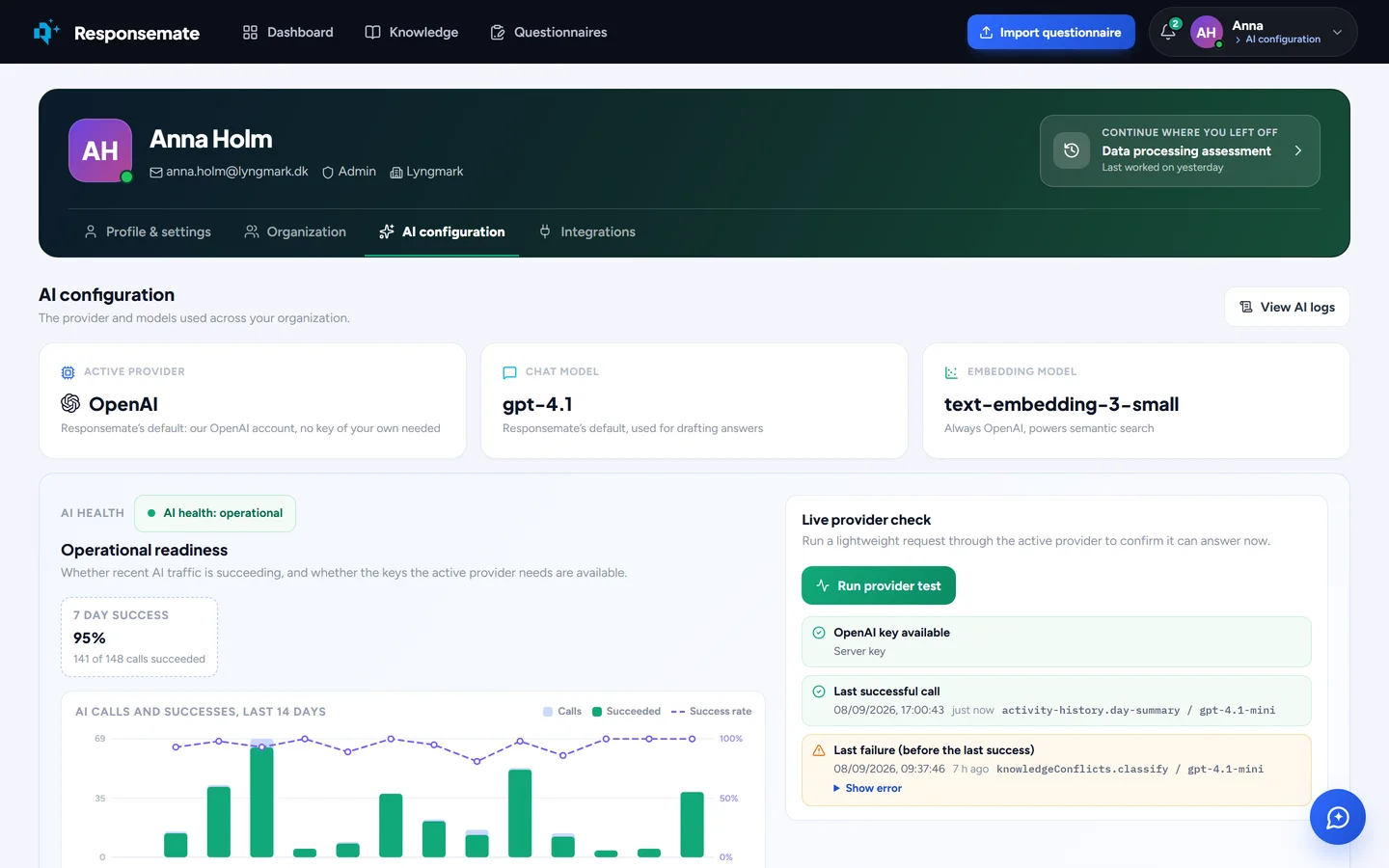
- Every AI call logged for admins: what it was asked, what it answered, how long it took
Your AI, your provider
The AI configuration tab shows the active provider and the models in use, a seven-day success rate, and a live provider test. Bring your own keys and the usage stays on your account and under your terms.
Related